Apple Coverage Check: the complete 2026 guide
Apple Coverage Check at checkcoverage.apple.com is now branded AppleCare & Warranty. This is the complete reference for what every result state means, what each field on a valid result actually says, and what the tool deliberately does not show.

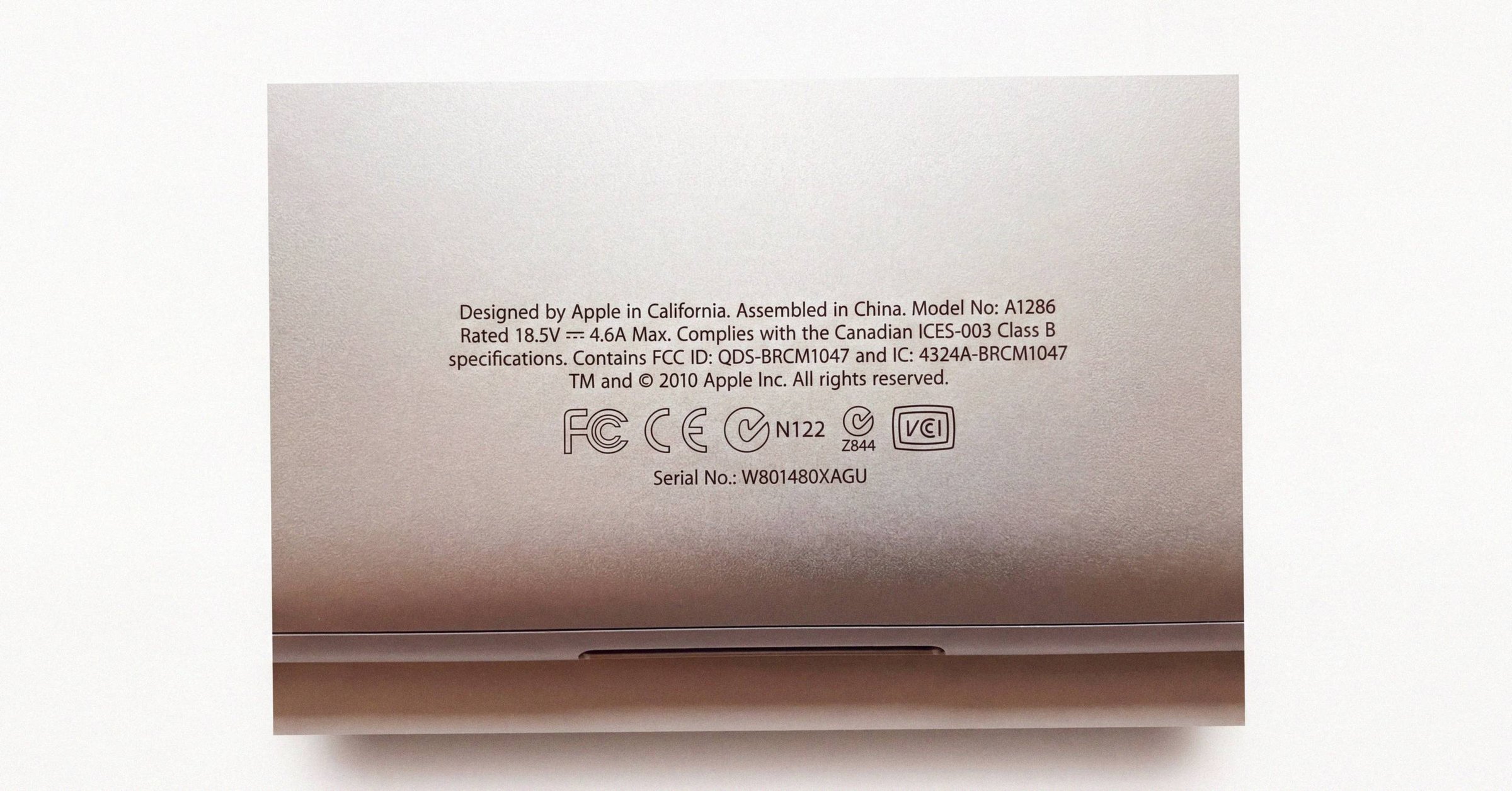
Apple Coverage Check at checkcoverage.apple.com is the free, no-sign-in tool that looks up a device's warranty and service-contract status from its serial number. It answers one narrow question well: is this hardware genuine, and what service is it entitled to. It deliberately answers nothing else. This guide is the complete reference for what every result state means, what each field on a valid result actually says, and what the tool does not show. For the cleanest one-page summary of the same material, see the dedicated Apple Coverage Check landing page.
The page is now branded AppleCare & Warranty (header: "View device coverage and benefits"), reflecting Apple's 2024-2025 consolidation of warranty UX into a single visual identity that matches the on-device Settings → General → AppleCare & Warranty panel. The older "Check Coverage" name is legacy. Same database, same field set, refreshed visual identity.
Where the data actually lives#
Coverage Check is one of three surfaces that read from the same underlying Apple records. The three caches refresh slightly out of sync.
- checkcoverage.apple.com. Anonymous lookup, by serial, no Apple ID required.
- mysupport.apple.com. Apple Account-tied. Richer view, and adds a downloadable Proof of Coverage PDF when the account has two-factor authentication enabled, per support.apple.com/en-us/102607.
- On-device. Settings → General → AppleCare & Warranty on iOS, iPadOS, and macOS. Usually the freshest because it reads the device's own provisioning record.
Disagreements between the three surfaces are common right after buying AppleCare+ or transferring a plan. Wait 24-72 hours; if it persists, call Apple Support with the serial and ask them to reconcile the records.
How to query the tool#
The tool localizes by IP geolocation, but you can target a result two ways:
- Region path:
checkcoverage.apple.com/<country>/<locale>/ - Locale parameter:
checkcoverage.apple.com/?locale=en_US
A serial can also be appended directly: checkcoverage.apple.com/?sn=..., which bypasses the input field and is convenient for batch checks. The country selector at checkcoverage.apple.com/country-region carries the explicit note that if your country or region is not listed, support is not offered through the web tool.
Serial-number formats and the "invalid" trap#
Apple's serial format changed in a way that directly affects this tool.
Legacy format (roughly 2010-2020). A deterministic 12-character alphanumeric string that encoded manufacturing data: assembly facility (positions 1-2), year and week of manufacture (positions 3-5), a unit identifier, and a configuration code. Third parties could parse model and origin from the serial alone.
Current format (rolled out 2020-2021). A randomized string, commonly 10 characters (it can range roughly 8-14). It first appeared publicly on the purple iPhone 12 in May 2021, confirmed by MacRumors. The randomized format no longer encodes facility, date, or configuration; those details now come only from a server-side database lookup.
The direct consequence: unofficial "serial decoder" tools produce false positives on post-2020 hardware because there is no longer a deterministic structure to parse. Apple's official portal is the reliable validator. For more on what you can and cannot read from a modern serial, see working with post-2021 Mac serial numbers.
Look-alike characters cause most "invalid" errors#
The randomized format is visually noisy and easy to mistype, especially where laser etching or low-contrast labels blur similar glyphs.
| Looks alike | Typical impact |
|---|---|
0 (zero) / O | Immediate "invalid serial" |
1 (one) / I | Fails to resolve |
2 / Z | Frequent OCR misread |
5 / S | Checksum/validation failure |
8 / B | Database parsing error |
D / O / Q | Lookup failure |
G / 6 | Token mismatch |
U / V | Server-side resolution failure |
Apple historically omitted the letters O and I from serials to prevent confusion with 0 and 1, per Apple's serial-number guidance. Before concluding a device is fake, re-enter the serial carefully and try the alternate character readings.
Result states and what each one means#
Coverage Check returns one of a small set of states. Apple iterates support copy without notice, so treat the verbatim strings below as accurate to roughly one digit of precision. Minor punctuation or label changes occur over time.
Healthy states#
Repairs and Service Coverage: Active. The device is genuine, has a purchase date on file, and is within either Apple's one-year Limited Warranty or an active AppleCare/AppleCare+ term. Apple's explanatory string is that the product is covered for eligible hardware repairs and service under Apple's Limited Warranty. Colloquially called "Limited Warranty Active"; the page itself shows the Repairs and Service Coverage line plus a Valid Purchase Date indicator and no AppleCare+ line.
Repairs and Service Coverage: Expired. Out of warranty. The device is still genuine and the serial is valid; Apple will not repair it for free. Paid out-of-warranty and battery service remain available. For what to do next, see what 'Coverage Expired' means on Apple Coverage Check.
Telephone Technical Support: Active / Expired. Apple includes 90 days of complimentary telephone support from the date of purchase, per support.apple.com/en-us/122114. After 90 days this line flips to Expired even if hardware warranty is still active. With AppleCare+ in force, phone support stays Active for the plan's term.
AppleCare+ Coverage / AppleCare+ with Theft and Loss Coverage: Active. A paid plan is attached. The page shows the plan name and end date but never the claim history. The exact label varies by region, but the structure is consistent.
Activate Your Device / "No Coverage Found". A message stating the device has not been registered and asking you to contact your retailer or carrier. Normal for a sealed, never-activated unit. On a device the seller describes as used, treat it as a question to resolve, not an automatic pass. The full walkthrough is in what 'No Coverage Found' means on Apple Coverage Check.
Deal-breaker and abnormal states#
"We're sorry, but this serial number isn't valid. Please check your information and try again." A literal mismatch. Either a typo (re-check the look-alike table above) or the string does not exist in Apple's catalog, which strongly suggests counterfeit hardware. A near-identical variant ("we're unable to check coverage for this serial number") is sometimes a transient system error. Retry later before assuming the worst.
"We're sorry, but this is a serial number for a product that has been replaced." The flagged or revoked state. The unit was replaced by Apple as defective, or reported lost or stolen, or stolen from inventory or in transit. Apple and all Authorized Service Providers refuse service on a "replaced" device, including paid out-of-warranty repair. The full implications are covered in why Apple Coverage Check says 'this serial number has been replaced'.
"Do Not Use". A rarer flag seen on some Apple Watch serials, not publicly explained by Apple but understood in the community as an internal logistics block: a unit that should never have left Apple's supply chain. Treat as equivalent to "replaced."
Purchase-date-not-validated messages. Variants include "We're unable to validate your product's purchase date" or a prompt to sign in with your Apple Account to update it. The serial is authentic, but Apple has no validated record of the commercial sale. Common for units sold through non-reporting channels. Warranty can be activated by registering with proof of purchase.
"Finish AppleCare Plan Setup". The hardware has coverage but the plan is not fully linked to a validated Apple Account. Typical with recurring-subscription plans needing a payment update or with regional account mismatches.
Fields shown on a valid result#
A valid lookup displays a deliberately minimal field set.
- Model name. The exact marketing name and configuration string. For example, "MacBook Pro 14-inch," "iPhone 15 Pro Max," or "Apple Watch Series 9 GPS + Cellular 45mm." Since the post-2021 serial no longer encodes configuration, this lookup is the only way to confirm the model from the serial alone. A physically modified device still returns its true factory model name.
- Estimated Purchase Date (or Date of Purchase). The single biggest source of confusion on this page. Covered in the next section.
- Valid Purchase Date indicator. A green check meaning Apple has validated the date against a reseller record. Absent or flagged if not.
- Telephone Technical Support: Active / Expired.
- Repairs and Service Coverage: Active / Expired. The explanatory text identifies which coverage is active: one-year Limited Warranty, AppleCare+, AppleCare+ with Theft and Loss, or the legacy AppleCare Protection Plan.
- Estimated Expiration Date. When the active coverage ends.
- Action buttons. Set up a repair, Contact Apple Support, and (if eligible) a link to purchase AppleCare+.
The field set is identical across device types.
"Estimated Purchase Date" is not the receipt date#
This is the single biggest source of confusion on the page. The Estimated Purchase Date is not necessarily the retail receipt date. Apple's own warranty explainer is the canonical word: the coverage information is based on the date-of-purchase information available to Apple, and depending on when (or whether) you registered the product, the estimated date may be incorrect (per support.apple.com/en-us/102865).
The date is populated one of two ways.
- Direct reseller reporting. Authorized partners transmit sales logs to Apple, ideally setting the date at the actual sale.
- First-activation handshake. If the device came through a non-reporting channel, Apple sets the date to the day the device was first powered on, connected to the internet, and registered.
In practice:
- Bought direct from Apple and activated promptly: estimate is usually within a day or two of the real sale.
- Bought from a reseller and not registered immediately: Apple may fall back to an earlier date, sometimes the day Apple shipped the unit to the reseller, which can be weeks or months before you walked out of the store. This is the most common reason a brand-new educational MacBook shows weeks of "lost" warranty on day one.
- Gifted device that sat in a closet: the warranty clock has been ticking against the estimate.
- Apple Certified Refurbished: the warranty is supposed to start from your purchase from Apple; an earlier date warrants a correction.
- Gray-market import: the date may reflect the original distributor's purchase, not yours.
For the full mechanism and the correction process, see why your Mac's purchase date on Apple Coverage Check is wrong (and how to fix it).
The 1978 (and 1985) sentinel date#
A device that has never been activated, or that has been stripped of warranty status, can show a sentinel date, most famously April 1, 1978 (occasionally January 1, 1985). The year is a symbolic placeholder tied to Apple's founding era. It is widely associated with as-is liquidation stock, corporate demo units, or third-party refurbisher inventory. Such a device may contain genuine components but carries no Apple warranty relationship and may be ineligible for AppleCare+.
The placeholder date is real and observed by many users; its precise meaning is community-inferred, not officially documented by Apple. Treat it as a strong warning sign rather than a definitive verdict.
Region-locked warranty and the "invalid serial" trap#
Warranty service is restricted by country of original sale. Apple's iOS warranty document states that Apple may restrict warranty service for iPhone, iPad, Apple TV, HomePod, and Apple Vision Pro to the country where Apple or its authorized distributors originally sold the device.
This produces a well-known trap: a perfectly genuine device can return "this serial number isn't valid" or "no coverage" on one region's page while returning a clean record on another. A Vietnamese-purchased iPhone 13 (model code VN/A), for example, may show invalid on the US page but valid on the Vietnamese or Japanese equivalent. Causes include genuine country-locking and regional database synchronization latency.
If a device you bought abroad shows invalid locally, try the Coverage Check page for the country of original sale before concluding the device is fake. Representative regional URLs:
- United States:
checkcoverage.apple.com/us/en/or?locale=en_US - United Kingdom:
checkcoverage.apple.com/gb/en/ - Canada:
checkcoverage.apple.com/ca/en/(French:/ca/fr/) - Japan:
checkcoverage.apple.com/jp/ja/ - Germany:
checkcoverage.apple.com/de/de/ - France:
checkcoverage.apple.com/fr/fr/ - Australia:
checkcoverage.apple.com/au/en/ - Mainland China:
checkcoverage.apple.com/cn/zh/ - India:
checkcoverage.apple.com/in/en/
Apple Support responders routinely advise contacting support in the device's country/region for service requests on imported hardware. For the cross-platform differences in how the country-of-sale restriction applies on phones versus laptops, see Apple Coverage Check for iPhone vs Mac: what's different.
Refurbished, education, and gray-market devices#
Apple Certified Refurbished (from apple.com/shop/refurbished) is treated like new: a fresh Estimated Purchase Date matching your purchase from Apple, a fresh one-year Limited Warranty, and AppleCare+ eligibility within the standard 60-day window. Apple's refurbishment replaces the battery and (for some products) the outer shell, and may issue a new serial. The model field may be annotated accordingly.
Third-party "renewed"/refurbished (Amazon Renewed, Back Market, eBay refurbished) is not Apple Certified. Coverage Check typically shows the original end-user's purchase date, and the AppleCare+ enrollment window may already be closed. AppleCare One is the workaround for older-but-eligible devices.
Education and channel-sold units. Campus stores, business resellers, and similar channels behave like authorized-reseller sales. The Estimated Purchase Date often reflects the reseller's ship date, the leading cause of a new educational Mac appearing to have lost warranty on day one.
Gray-market imports. Usually return a valid record (the serial is genuine), but the model identifier suffix reveals the country of original sale, for example LL/A = U.S., ZP/A = Hong Kong, J/A or JP = Japan, VN/A = Vietnam, CH/A = mainland China. For iPhone, iPad, Apple TV, HomePod, and Vision Pro, that country governs where Apple must honor the warranty. The tool may say "Active," yet a local Apple Store can legally refuse physical service. For the model-number prefix breakdown (M, F, N, P, 3, 5) and what each implies for warranty, see Apple Coverage Check on refurbished and gray-market Macs.
AppleCare plan taxonomy#
Coverage Check displays whichever plan tier is active.
Apple Limited Warranty. Exactly one year from purchase or activation. Two years in Türkiye, per Apple's footnote to support.apple.com/en-us/102865. Covers manufacturing defects only; no accidental damage; no theft or loss. Transfers automatically with the hardware.
AppleCare Protection Plan (legacy). The original extended plan, predating AppleCare+, still sold for a few legacy products. Extends hardware warranty and phone support (historically up to 3 years on Mac); no accidental-damage coverage. Fully transferable.
AppleCare+. The current standard, per apple.com/applecare. Adds unlimited incidents of accidental damage from handling, each subject to a service fee: per Apple's terms, $29 for screen or back-glass damage and $99 for other accidental damage, per apple.com/legal/applecare. Includes 24/7 priority support and battery service when capacity falls below 80% of original. Sold as a fixed-term upfront purchase (24 months for iPhone/iPad/Watch, 36 months for Mac) or as a monthly/annual subscription.
AppleCare+ with Theft and Loss. Available only for iPhone, iPad, and Apple Watch. Bundles AppleCare+ with a separate insurance policy. In the U.S. underwritten by New Hampshire Insurance Company (NAIC #23841), an AIG company; in the U.K. by AIG UK Limited. Covers up to two theft or loss incidents per 12 months. Find My must be enabled at the time of loss and throughout the claim, per support.apple.com/iphone/theft-loss-claims.
AppleCare One. Added July 23, 2025, U.S.-only as of this writing. A multi-device subscription: $19.99/month for up to three products, plus $5.99/month per additional device. Accepts devices up to four years old (subject to a diagnostic) and extends Theft and Loss to iPad and Apple Watch for the first time, with up to three theft or loss claims per year across covered devices, per support.apple.com/en-us/122224. It is the only path to AppleCare-grade coverage on devices older than the 60-day window but under four years.
Transfer on resale#
AppleCare coverage stays with the device, not the owner, but only upfront/fixed-term plans are transferable. The process, per support.apple.com/en-us/111801:
- Sign in to My Support to get the AppleCare agreement number, the device serial number, and the Proof of Coverage.
- Find the original sales receipt for the device.
- Get the new owner's name, address, email, and phone number.
- Contact Apple Support.
The call typically takes 15-20 minutes, there is no fee, and Apple's records update within roughly 24-48 hours. Monthly and annual AppleCare+ subscriptions and AppleCare One subscriptions are tied to the billing relationship, not the device, and do not transfer. A used-Mac listing that claims an active subscription plan is misleading the buyer.
Platform differences#
The URL, CAPTCHA flow, result-page structure, field set, error messages, one-year Limited Warranty length, 90-day complimentary support, and core AppleCare+ behavior are identical across device types. Differences are in detail.
iPhone. Serial in Settings → General → About, or on the SIM tray on older models. IMEI is not shown on Coverage Check; verify on-device or via carrier. The country-of-sale warranty restriction applies most aggressively here. Eligible for AppleCare+ with Theft and Loss, shown as a distinct line.
Apple Watch. Serial inside the band slot, or Watch app → My Watch → General → About. Coverage Check on a watch serial returns the watch's own independent record; paired-iPhone status is not shown. As of the July 2025 changes, Watch Theft and Loss comes via AppleCare One.
Mac. Serial on the underside case, or → About This Mac → System Settings → General → AppleCare & Warranty. Macs are ineligible for Theft and Loss; AppleCare+ covers hardware failure and accidental damage. For the Mac-specific walkthrough, see how to check AppleCare status on a Mac.
What Coverage Check does NOT show#
This is the most important section for anyone vetting a used device. A clean result is necessary but not sufficient. A "Limited Warranty Active" line is fully compatible with a stolen, iCloud-locked, MDM-supervised phone.
The public tool is silent on:
- Activation Lock state. Apple removed its public Activation Lock checker in January 2017 per MacRumors. Any third-party site claiming to check Activation Lock by serial or IMEI is unverified and likely a scam. The only reliable check is in person: power the device on and watch for "iPhone Locked to Owner," "Activation Lock," or "Activate iPhone" screens. If you see any of these, do not buy. See support.apple.com/en-us/108794 and the Activation Lock verification walkthrough.
- Find My state and last sign-in.
- MDM (mobile device management) enrollment. A managed device can look clean, then re-enroll the moment it goes online, locking the new owner out of administrative settings.
- Repair history and parts authenticity. macOS Tahoe 26 and iOS 15.2+ expose a Parts and Service History entry in Settings → General → About for some replaced parts, the only buyer-side visibility, and only on the device itself. See how macOS Parts and Service tells you what's been replaced.
- Configuration (CPU, RAM, storage, color). The post-2021 serial does not encode it; verify on-device.
- Owner identity, original retailer, original price.
- Carrier/SIM lock. Verify on-device under Settings → General → About → Carrier Lock ("No SIM restrictions" = unlocked).
- IMEI / carrier blacklist status. A phone reported stolen to a carrier can show "Active" coverage while being blacklisted from cellular use.
For a Mac specifically, the buyer-side fix is to have the seller produce what the tool hides: ask the seller for a Macfax report, which covers Activation Lock, Find My, MDM enrollment, and battery and SSD health in one signed record you can re-verify on the Mac when it arrives.
Coverage Check vs. GSX#
Under the hood, Coverage Check queries Apple's internal GSX (Global Service Exchange) database but returns only a thin, privacy-preserving slice. GSX is a credentialed, certification-gated portal for Apple Retail, Authorized Service Providers, Independent Repair Providers, Self-Servicing Accounts, and Apple technicians.
What service partners can see that the public tool cannot:
- Activation policy and sold-to country; full activation-policy history.
- Find My / Activation Lock status in real time; iCloud lost/stolen status; "Do Not Repair," loaner, and replaced flags.
- MDM lock and carrier/SIM lock state.
- Last restore date, current OS version/build, Wi-Fi MAC address.
- Full repair history: parts ordered, technicians, dates, locations, and logic-board replacement history.
- Sold-to reseller, original retail price (in some cases), dispatch dates.
- Diagnostic results (AST1/AST2) and genuine-parts ordering.
The public page exposes only model, dates, and the two coverage lines. The structural significance is what right-to-repair advocates call the GSX gap: Apple's authoritative repair-history database exists, but the owner of the device cannot see it. For the full breakdown of the gap and what it means for second-hand buyers, see Apple repair history on a Mac.
Practical checklists#
If you're buying a used device#
- Run the serial through Coverage Check before meeting the seller. A "replaced," "isn't valid," or unexplained unregistered result is a hard stop.
- Confirm the returned model name matches the physical device: storage, color, generation. Since 2021 the lookup is the only way to verify configuration from the serial.
- Insist on an in-person (or video) handover and power the device on. "Locked to Owner," "Activation Lock," or "Activate iPhone" means walk away. Coverage Check cannot tell you this.
- Verify SIM/carrier lock on-device.
- If AppleCare+ is included, demand the transfer before payment. The seller calls Apple with the agreement number, serial, and original receipt and provides your details. Confirm the device under your name in mysupport.apple.com before closing.
- Treat a monthly or annual AppleCare+ as non-transferable and discount accordingly.
- Confirm the seller signs out of iCloud and Apple Account in front of you.
If you're selling#
- Run Coverage Check, screenshot the result, and use it in your listing. Fix the Estimated Purchase Date first if it is wrong so the buyer does not think you are misstating the age.
- Transfer or cancel AppleCare+ before handover. Cancel a monthly or annual plan in Settings → Subscriptions (prorated refund applies).
- Sign out of iCloud, erase the device, and confirm Find My is off before the buyer powers it on.
If you own a device showing the wrong date#
Use the "Update your purchase date" flow at support.apple.com/en-us/102865 with a dated, itemized receipt. Wait 24-72 hours. Call Apple Support if it does not update. The full process is documented in why your Mac's purchase date on Apple Coverage Check is wrong.
Important caveats and limits#
- Statutory rights can outlast the tool. In the EU, the two-year seller guarantee under Directive 2019/771 governs the first two years regardless of Coverage Check's expiration date, and the obligation is on the seller, not Apple.
- Wording drifts. Apple iterates support copy without notice; the verbatim strings here were accurate as of May 2026 but may shift in punctuation or label.
- The 1978/1985 placeholder meaning is community-inferred, not officially documented. The date is real; the as-is liquidation interpretation is a strong signal, not a certainty.
- Theft-and-Loss underwriters are region-specific. U.S.: New Hampshire Insurance Company / AIG; U.K.: AIG UK Limited; others elsewhere. The plan name on the tool is the same.
- AppleCare One is U.S.-only as of this writing; elsewhere the options are standard AppleCare+ (60-day window) or third-party insurance.
- A "replaced" flag is permanent and absolute. No Apple or AASP service, even paid. There is no documented appeal beyond proving the flag was applied in error.
What this means for the reader#
Coverage Check answers a narrow but important question: does this serial exist in Apple's database, and what does Apple's database say about it. That is exactly what you want to know before you wire money to a stranger. It does not answer the bigger questions a buyer ultimately cares about (was this Mac repaired, opened, dropped, immersed, replaced under AppleCare, used in a smoking household, advertised honestly), and pretending otherwise leads to overconfidence.
The ten seconds it takes to run Coverage Check filters out a real fraction of bad listings. The rest of the buyer's diligence happens at handoff, with the device booted, About This Mac open, and the chassis in good light.
Have a serial in front of you? The Macfax lookup reads the model, year and configuration, and shows what Apple's own tools leave out.
Related posts
Apple Coverage Check: how it works and what it shows
Apple Coverage Check is the free serial-lookup tool at checkcoverage.apple.com. It returns the exact model, warranty status, and AppleCare standing for any Mac, iPhone, or iPad. The 'Estimated Purchase Date' is the registration date, not the retail date, which catches buyers and sellers both off-guard.
Apple Coverage Check on refurbished and gray-market Macs
Apple Certified Refurbished Macs come with a fresh one-year Limited Warranty and full AppleCare+ eligibility. Third-party 'renewed' Macs do not. The model-number prefix (M, F, N, P, 3, 5) and region suffix (LL/A, J/A, VN/A) tell you which Coverage Check will show.
Apple Coverage Check for iPhone vs Mac: what's different
Apple Coverage Check uses the same URL, the same field set, and the same one-year Limited Warranty length on iPhone and Mac. The differences are where to find the serial, which AppleCare+ tiers are available, and how aggressively the country-of-sale warranty restriction applies.
Written by
Marcus WilliamsMarcus Williams covers Mac hardware and repair for Macfax. He spent six years on the bench at an Apple Authorized Service Provider in the Pacific Northwest before going independent, most of that time on logic-board repair, display assembly swaps, and the failure patterns Apple's diagnostics don't surface. He writes about what's inside a Mac, what breaks first, and what a serial number can and can't tell you about a unit's history.
More posts by Marcus →